Switching between Chroma 4K and 4-channel HD Encoder/Decoder Modes
The Streambox Chroma 4K with the 4:4:4/12-bit Color contains a Blackmagic Decklink 8K Pro input/output card which can be used for 12G-SDI 12-bit 4:4:4 input or output. The Decklink card has 2 modes: Full-Duplex (also called Duo SDI mode) in which the card has 2 inputs and 2 outputs, and Half-Duplex (Quad SDI Mode) in which all 4 video connectors are either inputs, or all outputs. This enables Quad-3G-SDI input for an Encoder or output for a Decoder.
With a software upgrade, however, the same hardware can be used for 4 individual HD video channels, either encoding or decoding.
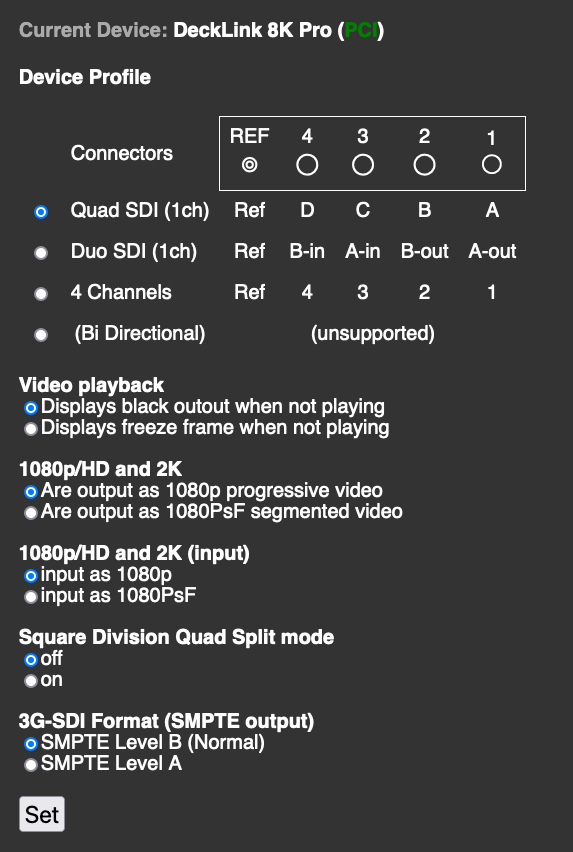
Access the control panel for switching modes by going to the Advanced Menu (available in the System tab of the main Web Control Interface), and selecting Settings -> Video Hardware -> BMD Config
The URL for this page is http://[IP Address]/avenir/settings_bmd.php
The BMD Config screen contains a map of the SDI connectors, as well as the Mode selector. The below image displays the input/output layout for each mode, and a place to select between Quad, Duo, and 4 Channel mode. Select the mode desired, as well as any other settings for the Blackmagic Decklink card, and click the "Set" button below.
Mode changes will stop current streams and restart the software. A reboot is not required.